




A report application server is a specialized server environment designed to help applications generate, process, manage, and deliver reports. It usually works between business applications, reporting tools, and the data sources that contain the information needed for a report.
The phrase report application server can describe a general reporting architecture, but it is also strongly associated with Report Application Server (RAS), a technology used in the SAP BusinessObjects and Crystal Reports ecosystem. In that environment, RAS provides services and software development interfaces that allow applications to open, view, create, modify, process, and export reports. SAP documentation continues to describe RAS as part of its Crystal Reports server architecture.
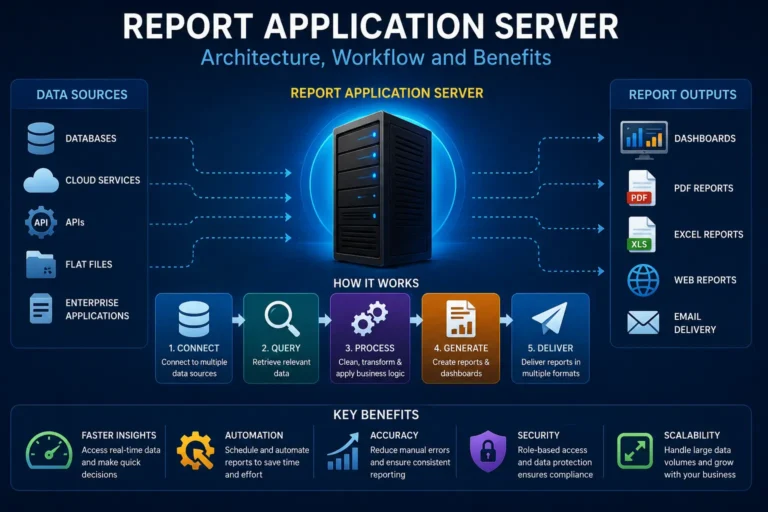
A modern report application server may work with information from many sources. These sources can include relational databases, data warehouses, cloud services, APIs, enterprise applications, files, and other business systems. This makes reporting servers useful for organizations that need to turn large amounts of business data into understandable information.
For example, a company might keep customer information in a CRM system, sales information in a SQL database, inventory information in an ERP platform, and website information in a cloud analytics service. A reporting application can bring relevant information together and present it in reports, dashboards, spreadsheets, PDFs, or web pages.
This guide explains what a report application server is, how it works, its main components, benefits, challenges, security considerations, modern architecture, and best practices.
What Is a Report Application Server?
A report application server is a server-side system that handles reporting tasks for applications and users.
In simple terms, it acts as a reporting engine between data and the final report.
A basic reporting process looks like this:
Data sources → Reporting application → Report application server → Processed report → User
The server can receive a request for a report, obtain the required information, apply report rules, process the data, create the requested output, and return the result to the application or user.
The exact features depend on the reporting platform.
In the SAP BusinessObjects environment, for example, the Report Application Server can manage report delivery and provide an SDK that applications can use to create and modify Crystal Reports at runtime. SAP documentation for Crystal Reports 2025 describes RAS as both a report delivery server and an SDK-based environment for working with reports programmatically.
This is different from a normal application server.
A general application server may run many types of business logic, such as customer management, order processing, authentication, or payment workflows. A report application server focuses more specifically on reporting operations.
What Does a Report Application Server Do?
The main purpose of a report application server is to handle reporting work that would otherwise have to be performed directly by an application.
Its common responsibilities include:
- Connecting to reporting data sources
- Retrieving data
- Applying filters and parameters
- Processing report logic
- Generating report pages
- Rendering report output
- Supporting report viewing
- Exporting reports
- Supporting report creation or modification
- Managing report sessions
- Caching report information
- Supporting application integration
- Helping applications scale reporting workloads
The exact combination depends on the platform.
For example, the SAP Report Application Server SDK includes functionality for opening, creating, and modifying Crystal Reports, changing parameters and data sources, and exporting reports to formats such as PDF, Microsoft Word, Microsoft Excel, and XML.
How Does a Report Application Server Work?
A report application server usually follows a series of steps.
1. A User or Application Requests a Report
The process starts when a user opens a report or when an application requests one.
For example, a sales manager might request a monthly sales report.
The application sends the report request to the reporting infrastructure.
The request may include parameters such as:
- Date range
- Customer
- Product
- Region
- Department
- Sales representative
- Report format
2. The Server Identifies the Report
The reporting server determines which report definition should be used.
The report definition may contain information about:
- Data sources
- Fields
- Calculations
- Filters
- Groups
- Sorting
- Charts
- Formatting
- Parameters
- Page layout
In SAP BusinessObjects, reports can be managed through the BI platform repository or accessed as unmanaged report files. SAP documentation explains that RAS can work with both managed and unmanaged reports.
3. The Server Connects to Data Sources
The report application server then retrieves the required data.
Depending on the reporting system, the data can come from:
- SQL databases
- Data warehouses
- Cloud databases
- Enterprise applications
- APIs
- XML data
- Structured files
- Business intelligence platforms
- Other application services
A reporting system may use one data source or multiple sources.
Also Read: Woeken: Origin, Uses, Definition & What It Really Means
This is one reason reporting servers are important in modern businesses. Business information is often distributed across many systems.
4. The Server Applies Business Logic
The server processes the retrieved information according to the report definition.
It may:
- Filter records
- Sort information
- Group records
- Calculate totals
- Calculate percentages
- Apply formulas
- Apply parameters
- Create summaries
- Generate calculated fields
- Apply security rules
The result is transformed from raw information into a structured report.
5. The Report Is Rendered
The reporting engine converts the processed information into a format that users can understand.
Common formats include:
- HTML
- Excel
- Microsoft Word
- XML
- Web-based report views
The available formats depend on the reporting platform.
6. The Result Is Delivered
The final report is delivered to the application or user.
A report may appear inside a business application, in a web browser, or as a downloadable document.
Some organizations also automate report delivery through scheduled processes or other enterprise distribution systems.
Report Application Server vs. Application Server
These two terms are related but should not be treated as identical.
An application server is designed to execute application logic and support business applications.
A report application server is focused on reporting operations.
For example, consider an online retail company.
The main application server may handle:
- Customer accounts
- Shopping carts
- Orders
- Product searches
- Payments
- Business workflows
The report application server may handle:
- Sales reports
- Inventory reports
- Customer reports
- Financial reports
- Performance reports
- Operational summaries
Separating these responsibilities can prevent heavy reporting workloads from placing unnecessary pressure on the main application.
Historical SAP material describes the Report Application Server as a way to move report processing away from the application server, helping improve application performance.
Report Application Server and Crystal Reports
The term Report Application Server has a particularly important historical connection with Crystal Reports.
Crystal Reports became widely used for designing business reports, and Report Application Server technology provided a way for applications to work with those reports through server-side processing and programming interfaces.
Modern SAP documentation still provides Report Application Server SDK documentation for Crystal Reports and describes RAS architecture, SDKs, viewers, caching, data connections, and scalability.
This means that someone searching for report application server may be looking for one of two things:
- A general explanation of reporting application servers
- Technical information about SAP Crystal Reports Report Application Server
Understanding this distinction is important when researching the term.
Key Components of a Report Application Server
A reporting environment usually contains several components.
Report Engine
The report engine performs the actual reporting work.
It interprets the report definition and determines how data should be processed and presented.
Data Connectivity Layer
This component allows the reporting system to communicate with data sources.
It may support database connections, application interfaces, files, and other systems.
Report Definition
The report definition describes what the report should contain.
It can specify fields, formulas, filters, grouping, sorting, charts, parameters, and layout.
Application Interface
An application interface allows another application to communicate with the reporting system.
This is commonly implemented through APIs or SDKs.
Report Viewer
A report viewer allows users to view reports through an application or browser.
SAP documentation includes both Java viewer and .NET report viewer architectures for its RAS environment.
Caching Layer
Caching can reduce repeated processing.
If the same report information is requested repeatedly, the system may reuse previously processed information instead of performing every operation again.
Caching must be designed carefully because reports containing sensitive or rapidly changing information may require special controls.
Security Layer
Security controls determine who can access reports and data.
Security may involve:
- Authentication
- Authorization
- Role-based access
- Data-level permissions
- Encryption
- Secure credentials
- Audit logging
- Network controls
What Data Sources Can a Report Application Server Use?
A report application server can potentially work with many kinds of data sources, depending on the platform and connectors available.
Relational Databases
Common enterprise databases include systems based on SQL.
Examples include:
- Microsoft SQL Server
- Oracle Database
- PostgreSQL
- MySQL
The reporting system can query tables and views to obtain business information.
Data Warehouses
Organizations with large analytical workloads may use data warehouses.
A report application server can retrieve prepared analytical data from these systems.
Cloud Data Platforms
Modern organizations increasingly store information in cloud environments.
Reporting applications may connect to cloud databases, data warehouses, SaaS applications, and analytics services.
APIs and Web Services
APIs allow applications to exchange information.
A reporting workflow may use an API to obtain information from a separate business system.
However, API-based reporting requires careful attention to authentication, rate limits, error handling, and data consistency.
Files and Documents
Some reporting environments can work with structured files such as XML, CSV, or spreadsheets.
Files can be useful for smaller workflows but may create data-quality and version-control problems if used as a primary reporting source.
Why Do Businesses Use Report Application Servers?
Businesses use reporting servers because raw data is rarely useful by itself.
A database can contain millions of records, but decision-makers often need a short summary.
For example, a company executive may not want to examine thousands of individual transactions. Instead, the executive may need:
- Total revenue
- Revenue by region
- Top products
- Sales growth
- Customer activity
- Operating costs
A reporting system transforms detailed records into information that is easier to understand.
Main Benefits of a Report Application Server
Centralized Reporting
A reporting server can provide a central place for report processing.
This can reduce the need to build separate reporting logic into every application.
Better Application Performance
Separating report processing from other application workloads can reduce pressure on the main application server.
This is especially useful when reports involve complex queries or large datasets.
Reusable Reports
Organizations can create reports once and allow multiple applications or departments to use them.
Automation
Reporting processes can be automated.
For example, an organization might generate a regular management report without requiring an employee to manually build it each time.
Multiple Output Formats
Reports can often be delivered in several formats.
This helps different users work with the same information in different ways.
Scalability
A dedicated reporting architecture can make it easier to increase reporting capacity as demand grows.
SAP documentation includes guidance for RAS scalability and web farm or web garden environments.
Application Integration
Developers can integrate reporting capabilities directly into business applications.
This means users may not need to leave the main application to access important reports.
Report Application Server Architecture
A simple architecture can look like this:
User or business application
↓
Web or application layer
↓
Report application server
↓
Report engine
↓
Data connectivity layer
↓
Databases, APIs, cloud services, or files
The architecture can become more complex in enterprise environments.
Large deployments may include:
- Multiple application servers
- Multiple reporting servers
- Load balancing
- Central management services
- Shared repositories
- Caching services
- Authentication systems
- Monitoring systems
- Backup infrastructure
The goal is to make reporting reliable while protecting the underlying data.
Managed vs. Unmanaged Reports
In the SAP BusinessObjects environment, RAS can work with managed and unmanaged reports.
Managed reports are associated with the BI platform repository.
Unmanaged reports can exist as report files on a file system.
SAP documentation notes that report file access is controlled by the configured Report Directory and that report files should generally be stored appropriately for performance and security.
This distinction matters because storage, access control, deployment, and maintenance can differ between the two approaches.
Report Application Server SDK
A major advantage of a report application server can be its software development kit.
An SDK allows developers to control reporting features programmatically.
Depending on the platform, developers may be able to:
- Open reports
- Set parameters
- Change data sources
- Modify report objects
- Create reports
- Export reports
- Read report information
- Manage report sessions
- Integrate reports into applications
SAP’s RAS documentation describes SDK functionality for working with report documents and database objects. For example, its Java SDK includes a DatabaseController that can manipulate database objects contained in a report, including data sources and tables.
How Developers Use a Report Application Server
A developer might build a customer management application with a built-in reporting feature.
When the user clicks “Generate Customer Report,” the application can send the request to the reporting server.
The request could contain:
- Customer ID
- Date range
- Report name
- Output format
The reporting server then processes the report and returns the result.
This architecture separates business application development from report processing.
That separation can make large systems easier to maintain.
Report Application Server Performance
Performance is one of the most important concerns in reporting systems.
Reports can become expensive when they process large amounts of data.
A report may be slow because of:
- Poor database queries
- Missing indexes
- Large datasets
- Complex formulas
- Excessive grouping
- Repeated calculations
- Slow network connections
- Inefficient report design
- Too many simultaneous users
- Poorly configured caching
Improving reporting performance should therefore begin with understanding where the time is being spent.
A common mistake is to assume that the reporting server itself is always responsible for a slow report.
In reality, the database query may be the main bottleneck.
How to Improve Report Application Server Performance
Optimize Database Queries
Use efficient queries and appropriate database indexes.
Avoid retrieving data that the report does not need.
Reduce Unnecessary Data
A report that needs 10,000 records should not retrieve 10 million records and filter them afterward if the filtering can be performed efficiently at the data source.
Use Appropriate Caching
Caching can reduce repeated processing.
However, cached information should have an appropriate lifetime and access policy.
Separate Heavy Workloads
If possible, separate intensive reporting workloads from transactional application workloads.
Monitor Resource Usage
Monitor:
- CPU
- Memory
- Network
- Database performance
- Report processing time
- Concurrent users
- Error rates
Review Report Design
Poorly designed reports can consume unnecessary resources.
Simple report structures are often easier to process and maintain.
Report Application Server Security
Security should be treated as a core part of reporting architecture.
Reports can contain highly sensitive business information.
Examples include:
- Customer information
- Employee information
- Financial information
- Sales data
- Business strategy
- Operational information
- Internal performance metrics
A secure reporting environment should control access at multiple levels.
Authentication
Users should be properly authenticated before accessing restricted reports.
Authorization
Authentication answers “Who are you?”
Authorization answers “What are you allowed to access?”
A sales employee may be allowed to see regional sales data but not company-wide financial information.
Least Privilege
Users and applications should receive only the permissions they need.
This reduces the potential impact of compromised credentials.
Secure Credentials
Database passwords and API credentials should not be placed directly inside source code.
Secrets should be managed through appropriate secure mechanisms.
Encryption
Sensitive information should be protected during transmission and, where appropriate, while stored.
Audit Logging
Organizations should consider logging important activities such as:
- Report access
- Report changes
- Administrative actions
- Authentication events
- Export activity
Logs can help identify unusual behavior and support investigations.
Privacy Risks in Reporting Systems
Report application servers can create privacy risks because they may bring together information from multiple systems.
Combining data can make a report more sensitive than any single source.
For example, a company might separately store customer purchases and customer contact information. A combined report could expose a much more detailed profile.
Organizations should therefore ask:
- What data does the report actually need?
- Who should see it?
- How long should it be stored?
- Can personally identifiable information be removed?
- Can access be restricted by role?
- Are exports controlled?
- Are logs protected?
Privacy should be considered during report design rather than added after deployment.
Legal and Compliance Considerations
A report application server does not automatically make an organization compliant with privacy or security laws.
Compliance depends on the data, organization, industry, location, and applicable regulations.
Organizations operating in the United States may need to consider laws and regulations that apply to their specific activities.
Depending on the situation, relevant requirements may involve:
- Consumer privacy
- Financial information
- Healthcare information
- Employee information
- Data retention
- Security controls
- Breach response
Companies should work with qualified legal, privacy, and security professionals when compliance obligations are significant.
Common Problems With Report Application Servers
Slow Reports
Slow reports can result from inefficient queries, excessive data processing, or insufficient server resources.
Database Connection Failures
A report may fail when credentials, network connections, database availability, or connection settings are incorrect.
Authentication Problems
Users may be unable to access reports because of expired credentials, incorrect permissions, or configuration problems.
Incorrect Data
Incorrect reports are often more dangerous than slow reports.
A report may produce incorrect results because of:
- Bad joins
- Duplicate records
- Incorrect filters
- Outdated data
- Wrong formulas
- Inconsistent source systems
High Server Load
A large number of users requesting complex reports at the same time can increase CPU and memory consumption.
Caching Problems
A cached report may show older information than the user expects.
Caching rules should therefore match the business need for fresh data.
Report Application Server Troubleshooting
When a report fails, troubleshoot the problem systematically.
First, determine whether the issue affects one report or many reports.
If only one report is affected, examine:
- Report definition
- Data source
- Query
- Parameters
- Formulas
- Permissions
If many reports are affected, examine:
- Server health
- Database connectivity
- Authentication
- Network configuration
- Shared services
- System resources
A useful troubleshooting sequence is:
- Confirm the user can access the application.
- Confirm the report exists.
- Check authentication.
- Check report permissions.
- Check data-source connectivity.
- Test the underlying query.
- Review server logs.
- Check CPU and memory.
- Check concurrent report activity.
- Review recent configuration or software changes.
Report Application Server in Cloud Environments
Modern reporting architectures increasingly operate in cloud or hybrid environments.
A cloud-based reporting architecture may connect:
- Cloud databases
- SaaS applications
- APIs
- Enterprise systems
- On-premises databases
- Data warehouses
This creates flexibility but also introduces new considerations.
Organizations must manage:
- Identity
- Network access
- API security
- Data transfer
- Cloud costs
- Availability
- Data residency
- Monitoring
A hybrid reporting environment can be particularly useful when a company has both older on-premises systems and newer cloud applications.
Report Application Server and APIs
APIs are increasingly important to modern reporting.
An API can provide information that does not exist in a traditional database.
For example, an application might use an API to retrieve:
- Shipping information
- Marketing statistics
- Customer service data
- Cloud application records
- External business information
However, APIs should not be treated exactly like databases.
They may have:
- Rate limits
- Authentication requirements
- Temporary failures
- Pagination
- Changing response formats
- Availability restrictions
A robust reporting architecture should handle these conditions.
Report Application Server and Business Intelligence
A report application server is often part of a broader business intelligence environment.
Business intelligence includes processes and technologies used to transform business data into useful information.
A typical BI environment may include:
- Data sources
- Data integration
- Data warehouses
- Data models
- Reporting tools
- Dashboards
- Analytics
- Reporting servers
- Governance
- Security
The report application server is therefore usually one component of a larger system.
Report Application Server vs. Reporting Tool
A reporting tool and a report application server are not necessarily the same thing.
A reporting tool is generally used to design or analyze reports.
A reporting server provides server-side infrastructure for processing and delivering those reports.
For example:
Reporting designer → creates report
Reporting server → processes and delivers report
Database → provides data
Application → connects users to the reporting experience
These components can work together.
Report Application Server vs. Database Server
A database server stores and retrieves structured data.
Also Read: MyAnonaMouse: The Complete Guide to the Private Ebook Torrent Tracker
A report application server uses data to produce reports.
The database answers questions such as:
“What records exist?”
The reporting system answers questions such as:
“How should these records be filtered, grouped, calculated, and presented to the user?”
The two systems have different responsibilities even though they work closely together.
Report Application Server vs. Dashboard Platform
Dashboards are designed to provide visual, often interactive views of information.
Traditional reports may focus more on:
- Detailed records
- Formal layouts
- Printable documents
- Scheduled reporting
- Operational information
Modern business intelligence platforms can combine both approaches.
An organization may use dashboards for real-time monitoring and formal reports for monthly, quarterly, or regulatory reporting.
When Should a Business Use a Report Application Server?
A reporting server becomes especially useful when reporting needs become more complex.
It may be appropriate when:
- Many users need the same reports
- Reports must be integrated into applications
- Report processing is affecting application performance
- Data comes from multiple systems
- Reports require complex processing
- Reports need centralized management
- Reporting volume is growing
- Developers need programmatic report control
For a very small application with only a few simple reports, a dedicated reporting server may not always be necessary.
The correct architecture depends on workload, security requirements, budget, technical skills, and business needs.
How to Choose a Report Application Server
Organizations should evaluate several factors.
Data Source Support
Check whether the platform supports the databases, APIs, cloud services, and other systems the organization uses.
Development Support
Developers should verify available SDKs, APIs, programming languages, and frameworks.
Report Formats
Check whether the platform supports the required output formats.
Scalability
Consider both current and future reporting workloads.
Security
Review authentication, authorization, encryption, auditing, and integration with enterprise identity systems.
Administration
A system that is powerful but difficult to administer can create long-term operational problems.
Vendor Support
Enterprise reporting systems can become important infrastructure. Reliable documentation, updates, and support matter.
Total Cost
The cost may include:
- Software licensing
- Infrastructure
- Cloud services
- Administration
- Development
- Training
- Support
- Security
- Maintenance
Best Practices for Report Application Server Management
Keep Reports Simple Where Possible
Complex reports can be difficult to troubleshoot and expensive to process.
Use Clean Data Models
Good data structures make reporting easier and more reliable.
Separate Development and Production
Do not use production systems as testing environments whenever avoidable.
Control Report Permissions
Review who can view, modify, export, and administer reports.
Monitor Report Performance
Track slow reports rather than waiting for users to complain.
Document Data Sources
Every important report should have clear information about where its data comes from.
Validate Report Results
Important reports should be tested against trusted source data.
Review Old Reports
Unused reports can create unnecessary maintenance and security risks.
Protect Exported Files
A secure reporting server cannot protect information after a user exports a sensitive report and stores it somewhere insecure.
The Future of Report Application Servers
Reporting technology is changing as organizations adopt cloud computing, artificial intelligence, automation, and modern analytics.
One major change is the movement from static reporting toward interactive analytics.
Another change is the increasing use of APIs and cloud data sources.
Artificial intelligence may also make reporting systems easier to use. Users may eventually be able to ask natural-language questions such as:
“Show me the five regions with the largest sales decline this quarter.”
The system could potentially translate the request into a query and generate a suitable visualization.
However, AI-generated reporting introduces an important requirement: validation.
A report should not be trusted simply because an AI system produced it.
Businesses still need:
- Accurate data
- Clear definitions
- Strong governance
- Human review
- Access controls
- Auditability
The future of reporting is therefore likely to combine automation with stronger data governance rather than replace governance entirely.
A Practical Example of a Report Application Server
Imagine a nationwide retail company.
The company has:
- A SQL database for transactions
- An ERP system for inventory
- A CRM system for customers
- A cloud analytics platform for website activity
Management wants a weekly business report.
Without a centralized reporting system, employees may manually collect information from different platforms.
With a reporting architecture, the process can be automated.
The reporting system retrieves relevant information, applies business rules, calculates key metrics, formats the results, and makes the report available to authorized users.
A manager might then see:
- Weekly sales
- Sales growth
- Inventory levels
- Top products
- Regional performance
- Customer activity
The important point is that the report application server does not magically create business intelligence.
Its value comes from connecting reliable data with well-designed reporting logic.
What Makes a Good Report Application Server?
A good report application server should provide a balance of performance, reliability, security, usability, and flexibility.
It should make reporting easier rather than create another layer of unnecessary complexity.
The most important qualities include:
- Reliable data access
- Strong security
- Good performance
- Scalable architecture
- Clear administration
- Useful APIs
- Flexible report formats
- Effective monitoring
- Good documentation
- Support for organizational requirements
The best reporting architecture is not necessarily the one with the most features.
It is the one that fits the organization’s actual reporting needs.
Key Insights About Report Application Servers
Several important lessons emerge when looking at report application servers.
First, reporting is an application workload, not simply a document-generation task.
Second, report quality depends heavily on data quality.
Third, separating reporting workloads from transactional workloads can improve system organization and performance.
Also Read: Oncepik: The Visual-First Productivity and Collaboration Platform
Fourth, security must cover both the reporting server and the data being reported.
Fifth, modern reporting environments increasingly need to connect traditional databases with APIs, cloud platforms, and other applications.
Finally, a reporting server should be treated as part of the organization’s broader data architecture rather than as an isolated tool.
Frequently Asked Questions About Report Application Server
What is a report application server in simple terms?
A report application server is a server that processes and delivers reports. It connects applications and users with data sources, applies report logic, and produces readable output such as web reports, PDFs, spreadsheets, or other supported formats.
Is a report application server the same as a web server?
No. A web server mainly handles web requests and delivers web content. A report application server specializes in report processing and delivery. The two can work together in the same application architecture.
Is Report Application Server related to Crystal Reports?
Yes. Report Application Server has a strong historical and current connection with SAP Crystal Reports. SAP documentation describes RAS as a server for report delivery and an SDK environment for creating and modifying Crystal Reports programmatically.
Can a report application server connect to multiple databases?
It can, depending on the reporting platform and available connectors. Enterprise reporting systems can often work with multiple data sources, although combining information from different systems requires careful data modeling and security.
Does a report application server store data?
Usually, its primary responsibility is processing and delivering reports rather than serving as the organization’s main data store. The underlying data is generally maintained in databases, warehouses, cloud systems, files, or other source systems.
Can a report application server create reports automatically?
Some platforms support programmatic report creation or modification. SAP’s RAS SDK, for example, provides APIs for working with report documents and report database objects.
Can a report application server export reports to Excel?
Many reporting platforms support spreadsheet export, although exact formats depend on the product. SAP’s current Crystal Reports RAS documentation lists Microsoft Excel among supported export targets.
Why is my report application server slow?
Common causes include inefficient database queries, large datasets, complex report formulas, excessive concurrent requests, insufficient server resources, or network problems. The database should be investigated as well as the reporting server.
Does caching improve report performance?
Caching can improve performance by reducing repeated processing. However, caching must be configured according to how frequently the underlying information changes and how sensitive the report data is.
Can a report application server work with cloud applications?
It can when the reporting platform supports the required cloud service, connector, API, or integration method. Modern reporting architectures commonly combine cloud and on-premises information.
What programming languages can work with Report Application Server?
The answer depends on the specific version and SDK. SAP documentation has historically provided Java and .NET development options for RAS, along with viewer technologies and related APIs.
What is the difference between RAS and a processing server?
The exact difference depends on the SAP BusinessObjects version and architecture. SAP’s current documentation distinguishes the Crystal Reports Report Application Server from the Crystal Reports Processing Server, with RAS providing report delivery and SDK capabilities for creating and modifying reports.
Can a report application server be used in a web farm?
Yes. SAP provides documentation for using Report Application Server in web farm and web garden environments. Such architectures can help organizations design reporting applications for larger or more distributed workloads.
Are report application servers secure by default?
No technology should be assumed to be completely secure by default. Security depends on configuration, identity management, permissions, network controls, software updates, credential management, and application design.
Can reports expose private information?
Yes. Reports can contain customer, employee, financial, or other sensitive information. Organizations should carefully control report access, exports, storage, and distribution.
What should developers check before deploying a reporting application?
Developers should check data-source connectivity, authentication, permissions, report performance, error handling, caching, scalability, logging, export behavior, and security controls.
Is a dedicated report application server necessary for every business?
No. Small applications with limited reporting needs may not need dedicated reporting infrastructure. A dedicated reporting environment becomes more valuable as report complexity, user demand, data volume, integration requirements, and governance needs increase.
Conclusion
A report application server is an important part of modern reporting architecture. Its basic purpose is to take reporting requests, access the required information, process that information according to defined rules, and deliver a useful report to an application or user.
The concept is broader than simply generating a PDF. A capable reporting environment can connect to databases, APIs, cloud services, enterprise applications, and other information sources. It can support report viewing, processing, exporting, caching, application integration, and programmatic report management.
The term also has a specific technical meaning in the SAP BusinessObjects and Crystal Reports ecosystem. SAP continues to document Report Application Server as a component that supports report delivery and SDK-based report creation and modification.
For businesses, the biggest value of a report application server is not the server itself. The real value comes from creating a reliable connection between business data and business decisions.
A well-designed reporting environment can improve reporting consistency, reduce manual work, support application performance, and make important information easier to understand.
At the same time, organizations should not overlook data quality, security, privacy, performance, and governance. A fast report with incorrect or unauthorized information can be more harmful than having no report at all.
The strongest approach is therefore to treat the report application server as one part of a larger data and application architecture. When the data is reliable, the report logic is clear, access is properly controlled, and the infrastructure is monitored, reporting technology can become a valuable foundation for better business decisions.